Documentation
Zendesk Integration
Automatically convert form inquiries into Zendesk support tickets with requester email mapping.
Overview
Turn contact requests, sales inquiries and feedback forms into Zendesk tickets for your support team.
Step 1: Locate Your Zendesk Subdomain
Look at your Zendesk browser URL: https://your-subdomain.zendesk.com. The subdomain is the prefix (your-subdomain).
Step 2: Create a Zendesk API Token
- In Zendesk Admin Center, go to Apps and integrations > APIs > Zendesk API.
- Enable 'Token Access' toggle.
- Click 'Add API token', enter description 'Formbold Integration', and copy the generated token.
Step 3: Connect in Formbold
- In Formbold, go to Integrations > click 'Zendesk'.
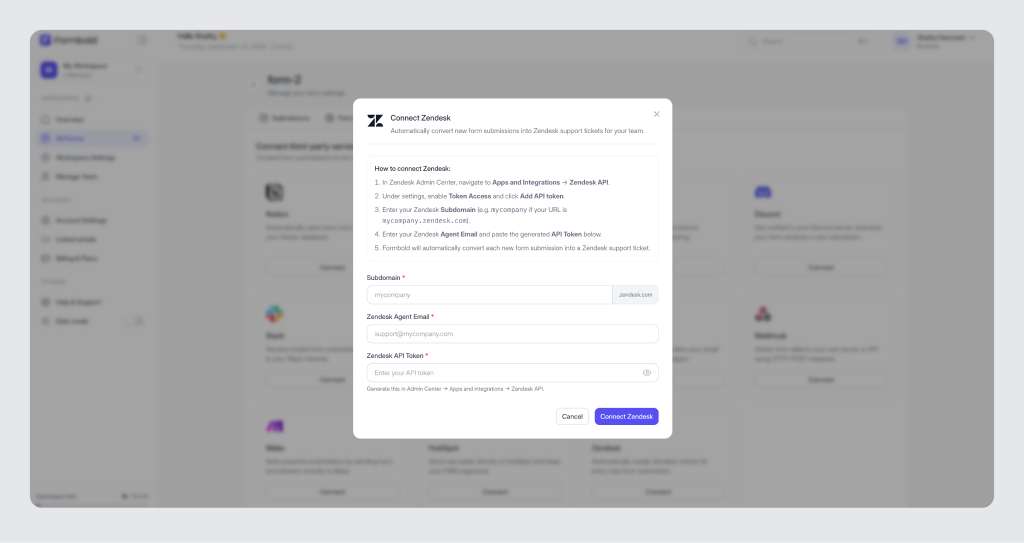
- Enter your Zendesk Subdomain, your Primary Admin Email, and the API Token.
- Map the form inputs to Ticket Subject, Requester Email, and Ticket Description.
- Click 'Save & Connect'.
Testing
Submit a test message on your frontend form. Check your Zendesk ticketing queue; a new ticket will be opened with the submitter set as the requester!
Last updated: September 10, 2026