Documentation
Zapier Integration
Connect Formbold to thousands of popular apps on Zapier using Catch Hook webhook triggers.
Overview
Zapier connects Formbold to thousands of apps without code. Create calendar events, add Trello cards, post to Discord, or update a CRM from each submission.
Step 1: Create a Zap with Webhook Trigger
- Log in to your Zapier dashboard and click 'Create Zap'.
- In the Trigger step, search for 'Webhooks by Zapier'.
- Select 'Catch Hook' as the Trigger Event and click 'Continue'.
- Zapier will generate your unique Webhook URL. Click 'Copy'.
Step 2: Connect Zapier in Formbold
- In Formbold, go to your form's 'Integrations' tab and select 'Zapier'.
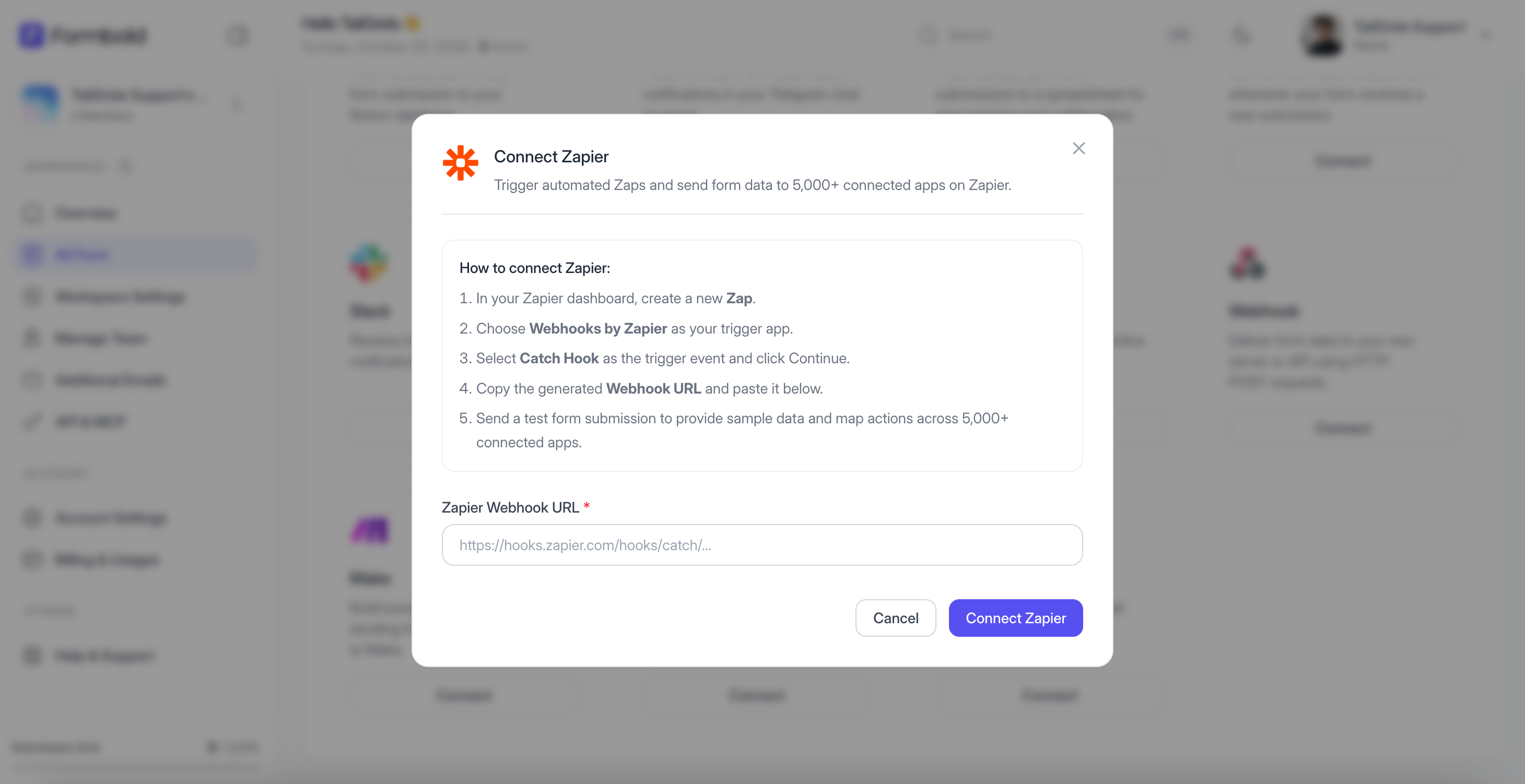
- Paste the copied Webhook URL into the field.
- Click 'Save & Connect'.
Step 3: Test Trigger and Add Actions
- Submit a test entry through your website form.
- In Zapier, click 'Test trigger'. Zapier will confirm receipt of the test submission.
- Add your desired Action app (e.g., Google Sheets, HubSpot, Slack, Airtable).
- Map the form fields into the action app and turn your Zap on!
Last updated: September 10, 2026