Manage Form Submissions
Read, sort and export the entries your form receives, and keep spam out of your way.
Where do I see my form submissions?
Open All Forms and click View Submissions on a form card. Or open the form and pick the Submissions tab. A New badge on the card, like "1 New", tells you there's something you haven't read.
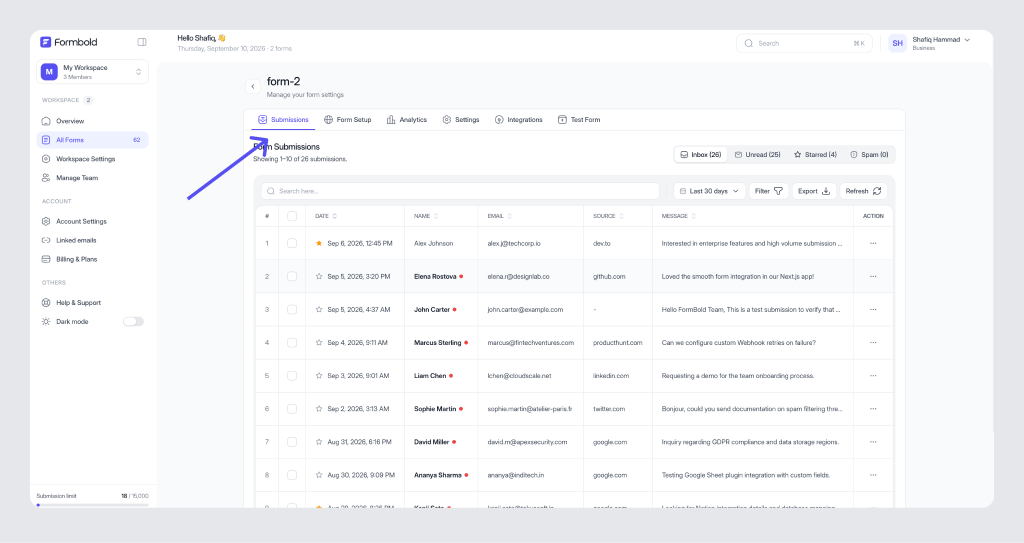
What do the Inbox, Unread, Starred and Spam folders mean?
Every form has four folders on the left of the Submissions tab.
- Inbox holds every submission that passed the spam check.
- Unread shows only the ones nobody has opened yet. It's the best place to start your day.
- Starred is your shortlist. Star the leads you need to follow up on and they stay here.
- Spam holds what Formbold's spam check caught. Look through it now and then, especially in the first week after launch, in case a real message got caught.
How do I read the submissions table?
Each row shows #, Date, TID, Name, Message and Action. The Action column holds what you can do with that row. The table is paginated, so use the page controls at the bottom on busy forms.
The submission count on a form card in All Forms adds up Inbox and Spam. If that number looks high next to your Inbox, check the Spam folder before you worry.
How do I filter submissions by date?
Use the All Time control above the table to narrow the date range, and Filter for other conditions. Click Refresh to load anything that came in while the page was open. The table doesn't update on its own.
If you see "No submissions to display" for a moment, wait a second. That message can flash while the table loads.
How do I export submissions to CSV?
Click Export above the table. You get a CSV file you can open in Excel, Numbers or Google Sheets.
Export is available on Starter, Premium and Business. On Free you can still read every submission in the dashboard.
Set the date range before you export. A client who asks for "last month's leads" doesn't want three years of data.
Can I get submissions somewhere else automatically?
Yes, and it's usually better than exporting by hand every week. Send each entry to Google Sheets, Slack, Notion or your own server from the Integrations tab. See Connecting Apps.
How long Formbold keeps submissions is up to you. That's set per form under Data retention.
Last updated: October 19, 2026