
Bots can flood your forms with fake submissions overnight. You wake up to an inbox full of spam and a submissions table full of junk data you never asked for.
Bots can fill out contact forms, submit fake email addresses, and send spam links. Some also probe your forms for security weaknesses. If you don't stop them, your forms quickly become hard to manage.
The good news is that a few simple methods can block most form spam. This guide covers 7 proven ways to stop bots from submitting forms and shows how Formbold helps protect your website.
Quick answer: Here are the 7 methods at a glance.
- Honeypot field: a hidden field that only bots fill in.
- CAPTCHA: a check that proves a real person is submitting.
- Form backend with spam protection: filters spam before it reaches you.
- Rate limiting: caps how many submissions one source can send.
- Double opt-in: confirms email addresses before they join your list.
- Minimum submission time: flags forms filled in too fast.
- IP and geo blocking: blocks traffic from known bad sources.
What Are Bots?
Bot is short for robot. A bot is automated software that does repetitive tasks on the internet. Many bots are helpful. For example, search engine crawlers scan pages so they can appear in search results.

Other bots are harmful. People build them to submit fake forms, post promotional links, create fraudulent sign-ups, or launch DDoS attacks that overload a website. Chatbots, shopping bots, and social bots fall somewhere in between. The goal is to block the bad bots without blocking real visitors.
Why Do Bots Try to Submit Forms?
Most form bots want to send spam or promote links. Here are the most common reasons bots target your forms:
Phishing and Email Abuse
Bots submit forms filled with phishing links. If your form sends an autoresponder or notification email, a bot can use it to deliver those links to other people from your domain. This can damage your email reputation.
Credential Stuffing
Credential stuffing bots target login forms. They test stolen usernames and passwords from past data breaches to break into real accounts. The flood of login attempts can also slow down your site.
SEO Link Spam
These bots target comment forms and other public submission forms. They post links to build backlinks for low-quality or suspicious websites.
Security Exploitation and Fuzz Testing
Some bots look for security holes. They submit forms with unusual, broken, or unexpected data, known as malformed inputs. Attackers then use any errors to find security weaknesses in your website.
How to Stop Bots from Submitting Forms: 7 Proven Methods
You can use any one of these methods, but combining two or more gives you the best protection.
1. Add a Honeypot Field to Your Form
A honeypot is a hidden form field. Real visitors cannot see it, so they leave it empty. Many bots read the HTML and fill in every field they find. When the honeypot has a value, you know a bot submitted the form.
Honeypots are free, easy to add, and invisible to humans, so they don't affect the user experience.
How to Add a Honeypot to Your Website
- Add an extra field to your form, such as website_check.
- Hide it from visitors with CSS and remove it from keyboard navigation.
- When the form is submitted, check the field on the server.
- Flag or quietly reject any submission where the field is filled in.
- Test the form with screen readers and other assistive technology.
Example: Honeypot Field in HTML
<div style="display: none;" aria-hidden="true">
  <label for="website_check">Leave this field empty</label>
  <input
    type="text"
    id="website_check"
    name="website_check"
    tabindex="-1"
    autocomplete="off"
  />
</div>
2. Use CAPTCHA
CAPTCHA is one of the best-known ways to block form spam. The name stands for "Completely Automated Public Turing test to tell Computers and Humans Apart." It checks that a real person is submitting the form.
Some CAPTCHAs ask users to solve a puzzle or tick a box. Others score visitor behavior in the background. Popular options include reCAPTCHA and hCaptcha. However, CAPTCHA is not foolproof. Some advanced bots can solve it, so pair it with other methods.
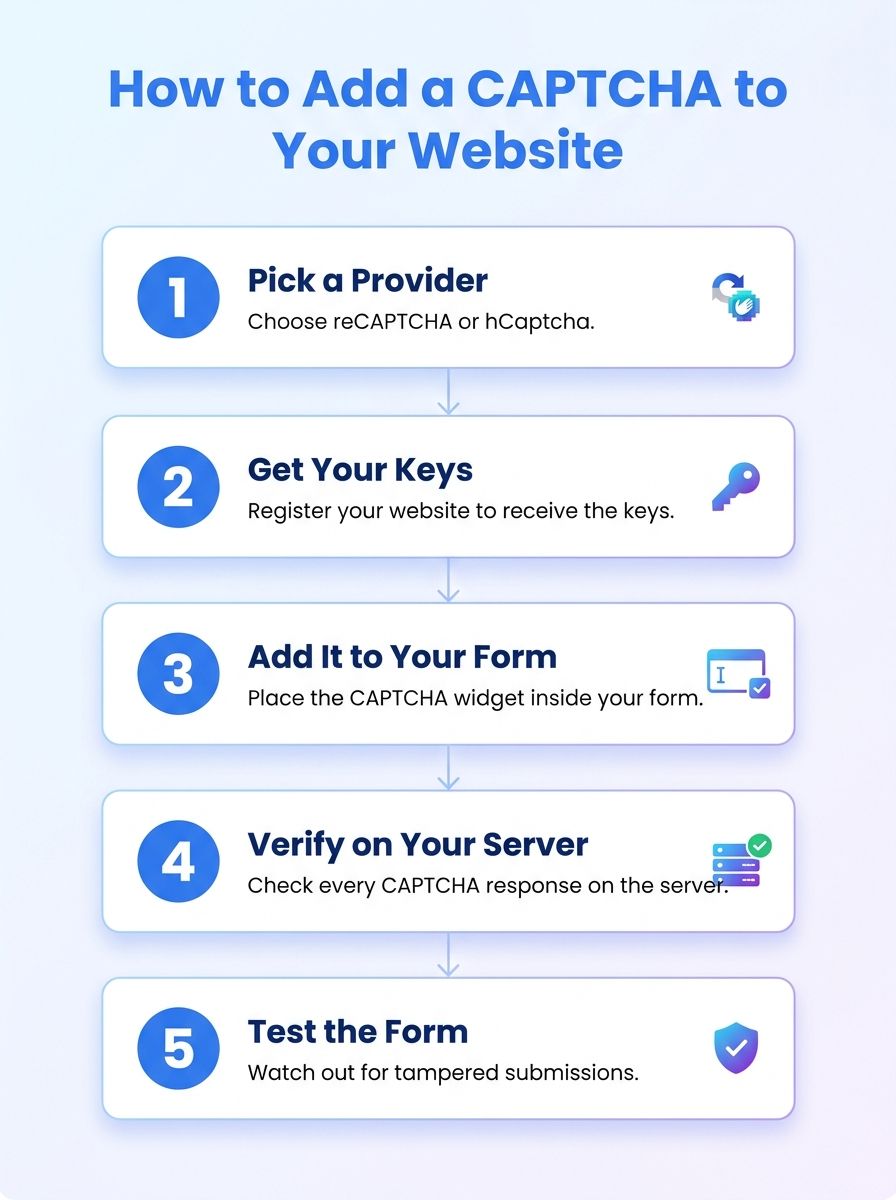
How to Add CAPTCHA to Your Website
- Pick a CAPTCHA provider, such as reCAPTCHA or hCaptcha.
- Register your website to get a site key and a secret key.
- Add the CAPTCHA widget to your form.
- Verify each CAPTCHA response on your server.
- Test the form and watch for submissions that skip the check.
3. Use a Form Backend Service with Built-In Spam Protection
A form backend receives and stores your form submissions, so you don't need to build your own server. Many form backends include built-in spam protection that filters junk before it reaches your inbox. You can also manage every response from a single dashboard, which saves time and effort.
Formbold is a form backend with a built-in spam filter and reCAPTCHA support. It also offers ready-made interactive forms that you can customize to match your site.
4. Add Rate Limiting to Form Submissions
Rate limiting controls how many requests one user or IP address can send in a set time. It helps when bots submit the same form again and again, or send many requests in a few seconds.
You can set up rate limiting in your backend, API gateway, reverse proxy, or web application firewall. Keep in mind that rate limiting can block real users. Many people can share one IP address, such as in an office or school. Use it together with other methods.
How to Implement Rate Limiting
- Set a reasonable request limit for each form.
- Track requests with a server-side or edge security tool.
- Temporarily block any source that goes over the limit.
- Return an HTTP 429 Too Many Requests response.
- Monitor the results and adjust the limit so you don't block real visitors.
5. Use Double Opt-In for Email Fields
Double opt-in asks users to click a confirmation link in their email before they join your list. Bots that submit fake or random email addresses never confirm, so they never get in. Shopify notes that double opt-in can reduce invalid email addresses by up to 40%.
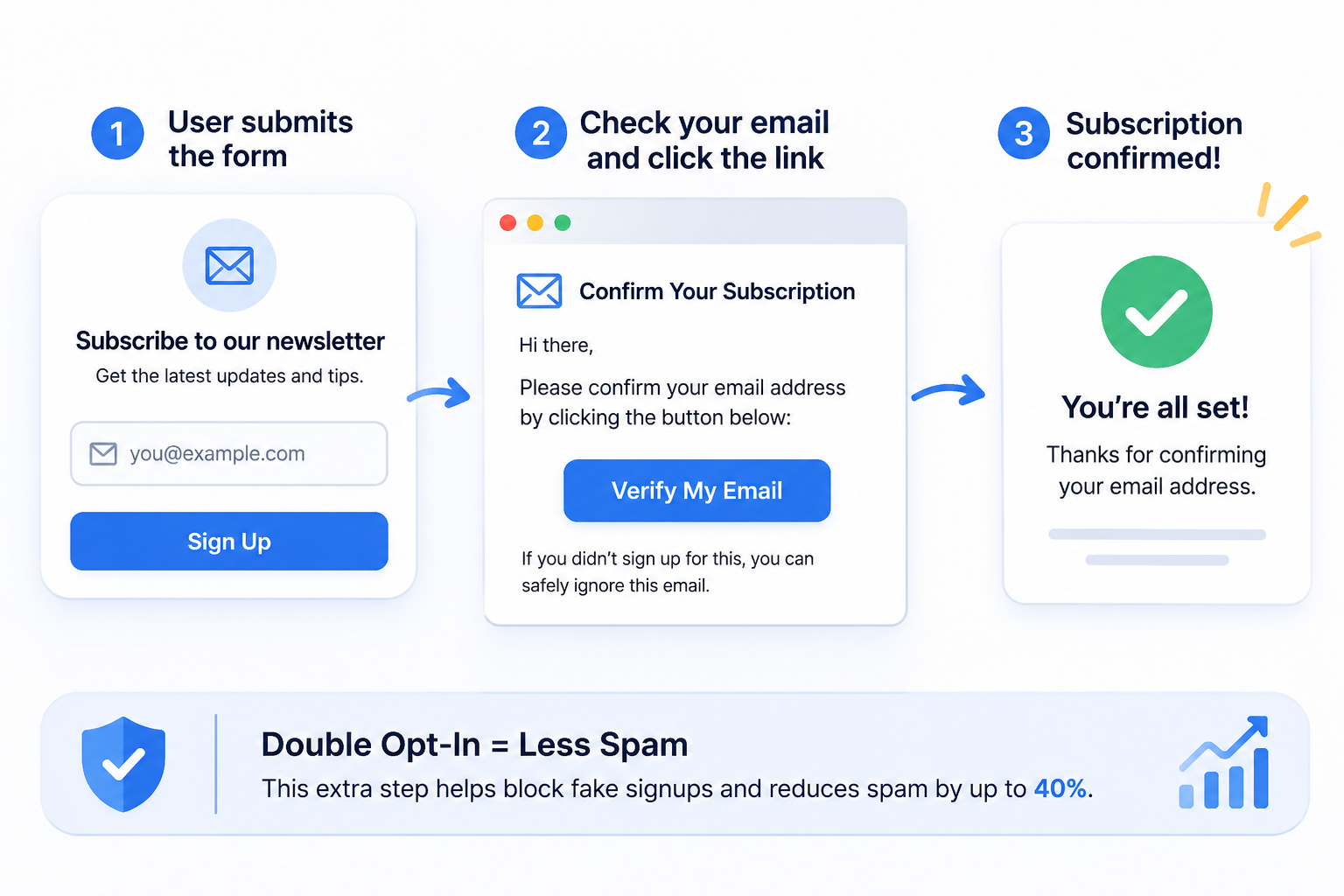
Double opt-in works best for newsletter signups, account registrations, and email subscriptions. However, it does not stop the form submission itself. Bots can still trigger confirmation emails to real people's addresses. Pair it with CAPTCHA or a honeypot field to block bots before they submit.
6. Set a Minimum Submission Time
Bots can fill out and submit a form in milliseconds. No real person can do that. A minimum submission time flags forms that were submitted too quickly to come from a human.
Choose your limit with care. A threshold that is too long can block fast, real users. For a short contact form, 2 to 3 seconds is a good starting point.
How to Add a Minimum Submission Time
- Record a timestamp or create a signed token when the form loads.
- Check how much time has passed when the submission arrives.
- Flag submissions that arrive faster than your threshold.
- Combine the check with a honeypot, server-side validation, or rate limiting.
7. Block Suspicious IPs and Geographic Regions
Some websites receive repeated spam from the same IP addresses or countries. Blocking those sources stops their traffic before it reaches your form.
Many bots run from data center servers, not home internet connections, which makes them easier to spot. A firewall such as Cloudflare or AWS WAF can block these sources by IP address or region. Be careful, though. Blocking a whole region can also block real visitors from that area.
How to Stop Form Spam With Formbold
Stopping spam with Formbold takes only a few minutes. First, create your form and integrate it with your website. Then follow these steps:
1. Connect Your Form to Formbold
Log in to your Formbold account and open the dashboard. Click the All Forms tab and create a new form.
Copy the form endpoint and add it to your form. Formbold works with HTML, React, Vue, TanStack, and more. You can also connect forms built with AI tools like Lovable, Bolt.new, v0, Cursor, or ChatGPT.
2. Turn On the Basic Spam Filter
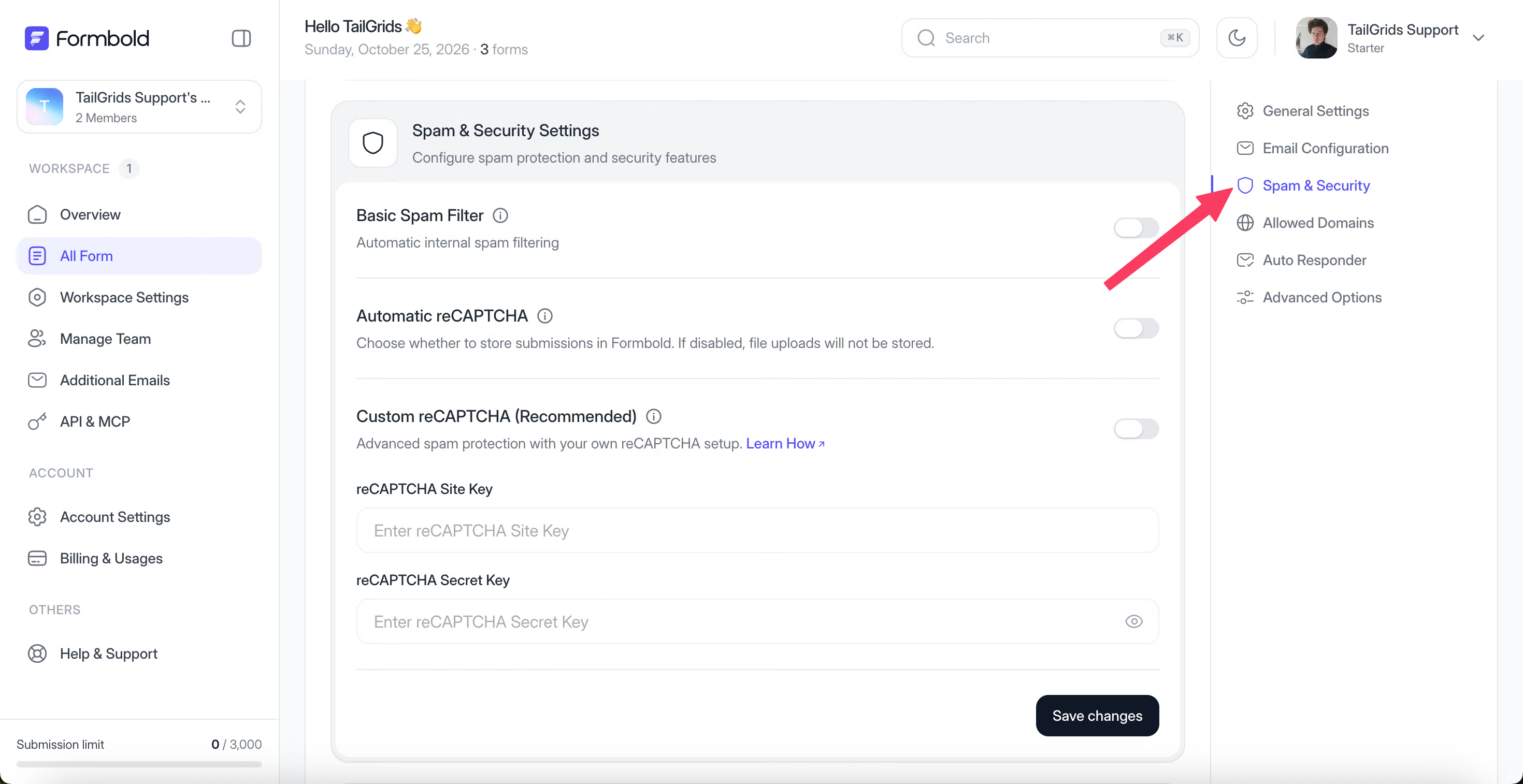
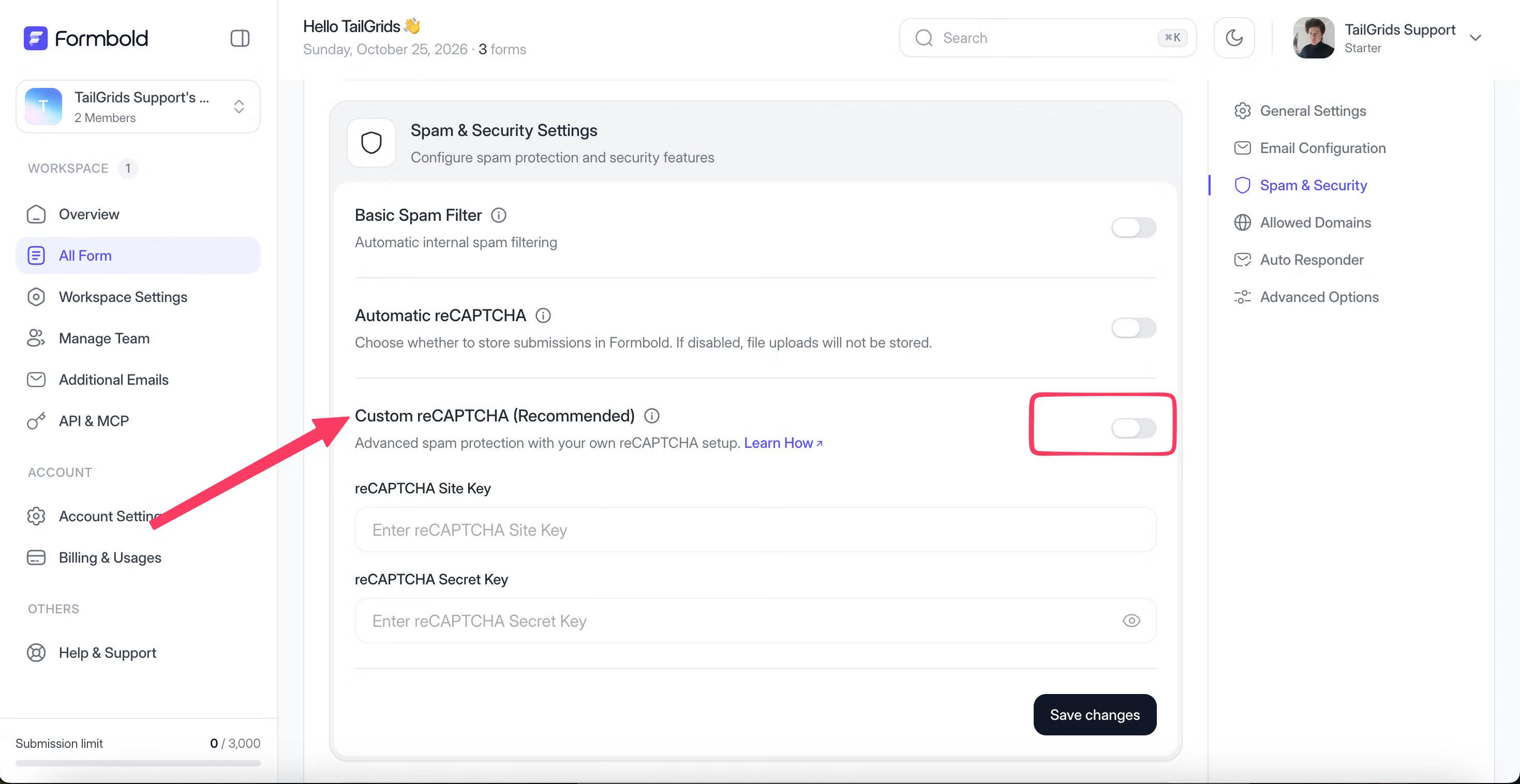
Open your form and go to Settings > Spam & Security. Turn on the Basic Spam Filter toggle. It checks each submission on Formbold's servers, so visitors don't see a puzzle or checkbox. It works instantly with no extra setup.
Formbold moves flagged submissions to the Spam folder in Submissions, so they stay out of your inbox.
3. Turn On reCAPTCHA Protection
For extra protection, Formbold offers two reCAPTCHA options in the same Spam & Security section:
- Automatic reCAPTCHA: Formbold adds the check for you, with no keys or code changes. It works best for standard HTML forms.
- Custom reCAPTCHA: add your own Google reCAPTCHA Site Key and Secret Key, then save. This is the recommended option for forms with real traffic, and it also works with fetch() or Ajax requests.
4. Test Your Form and Review Submissions
After you turn on protection, test the form. Submit a few entries from different devices and browsers to make sure real submissions get through. Check the Spam folder now and then for real messages flagged by mistake. If something doesn't work, read the Formbold Docs or create a support ticket.
Which Form Spam Prevention Method Should You Choose?
Use this table to compare each method at a glance:
| Prevention Method | Best For | Setup Difficulty | Main Limitation |
|---|---|---|---|
| Honeypot field | Catching basic bots without affecting user experience | Easy | Advanced bots can bypass it |
| CAPTCHA | Blocking automated form submissions through verification challenges | Easy to moderate | Can inconvenience users |
| Formbold spam protection | Filtering spam without writing backend code | Easy | Works only for forms connected to Formbold |
| Rate limiting | Preventing repeated submissions within a specific time period | Moderate | Bots can rotate IP addresses |
| Double opt-in | Verifying email addresses for newsletters and registrations | Easy to moderate | Users must confirm their email |
| Minimum submission time | Detecting forms submitted too quickly by automated scripts | Easy to moderate | May flag genuine fast submissions |
| IP and geographic blocking | Blocking suspicious traffic from specific IP addresses or regions | Moderate | May block legitimate visitors |
Frequently Asked Questions
How do I stop bots from submitting forms?
Use a form backend with built-in spam protection, plus CAPTCHA. This combination blocks most bots. For stronger protection, add a honeypot field, rate limiting, or IP blocking.
Can a honeypot stop all form bots?
No. A honeypot only catches bots that fill in every field. Smarter bots can detect and skip hidden fields. That's why you should use a honeypot together with other spam protection methods.
Is CAPTCHA enough to prevent spam submissions?
Not fully. CAPTCHA blocks many bots, but some advanced bots can solve it. Combine CAPTCHA with IP blocking, rate limiting, or double opt-in for better security.
How can I stop form spam without CAPTCHA?
Use built-in spam protection and honeypot fields. You can also add a minimum submission time and rate limiting. These methods work in the background, so visitors don't have to solve any puzzles.
Does robots.txt stop bots from submitting forms?
No. The robots.txt file only tells well-behaved crawlers which pages to crawl. Bad bots ignore it completely.
Final Words
Form spam wastes your time, clutters your data, and can put your website at risk. Whether you run an online store, a small business, or a high-traffic website, you need a plan to stop it.
Start with the easy wins: turn on built-in spam protection and add CAPTCHA. Then combine multiple methods, such as a honeypot field and rate limiting. Finally, monitor your forms regularly so you can spot new spam patterns early.
Ready to protect your forms? Get started with Formbold and turn on spam protection in minutes.