grid-border

Form Webhooks - Real-Time HTTP Integration

Receive each form submission as an HTTP POST request with a JSON body. Use it to send form data to your own backend, a serverless function, or tools like n8n, Pabbly, and IFTTT.

Webhooks

Integration Overview

Webhooks let you receive real-time HTTP POST notifications whenever a new form submission is completed. Instead of polling an API to check for new entries, FormBold sends a JSON payload to your server or automation endpoint as soon as the submission arrives.

You can use FormBold Webhooks with automation tools like n8n, Pabbly, and IFTTT, or send data straight to your own backend in Node.js, Python, Go, Ruby, or any other language. FormBold also has dedicated setup guides for Zapier and Make.

This is useful when your site has no backend of its own, such as a static site, but you still want submissions to reach your database, CRM, or internal tools.

FormBold Webhook Payload Structure

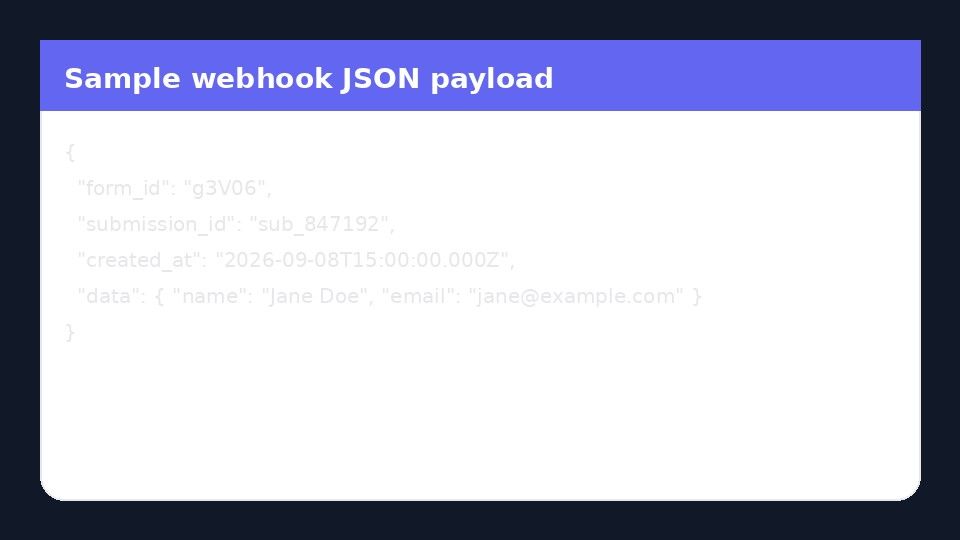
Each webhook delivery contains a JSON payload with the submitted fields, the submission ID, the form ID, and a timestamp. Here is an example of what your endpoint receives:

[@portabletext/react] Unknown block type "Code", specify a component for it in the `components.types` prop

The keys inside data match the name attribute of each input in your form.

How It Works

  1. A visitor submits your form.
  2. FormBold runs its spam checks and allowed-domain rules.
  3. If the submission passes, FormBold saves it and sends a POST request to your webhook URL.
  4. Your endpoint reads the JSON body and does whatever you need with it.

If your endpoint does not return a 2xx status code, FormBold retries the delivery automatically. Email notifications and other integrations keep running either way.

How to Set Up a Webhook

  1. Open your form in FormBold and go to the Integrations tab.
  2. Click Webhooks and enter your endpoint URL. It must start with https://.
  3. Optional: set a signing secret so your server can confirm each request came from FormBold.
  4. Click Save.
  5. Submit a test entry from your website and check that your endpoint received the request.

Example: Receive a Webhook in Node.js

[@portabletext/react] Unknown block type "Code", specify a component for it in the `components.types` prop

Common Uses

  • Save submissions to your own database: Store leads next to the rest of your app data.
  • Trigger serverless functions: Run code on AWS Lambda, Cloudflare Workers, or Vercel when a form is submitted.
  • Connect tools without a native integration: Send data to n8n, Pabbly, IFTTT, or an internal API.
  • Start custom workflows: Create an account, generate a document, or send a custom email from your own code.

Frequently Asked Questions

What format is the webhook payload?

JSON, sent as an HTTP POST request. See the example above.

What happens if my server is down?

If your endpoint does not return a 2xx status code, FormBold retries the delivery.

How do I know a request really came from FormBold?

Set a signing secret in the webhook settings and verify the signature on your server.

Can I use an http:// URL?

No. The endpoint URL must use https://.

Do spam submissions trigger the webhook?

No. FormBold filters spam before sending anything to your endpoint.

Start building automated forms in 60 seconds

No backend required. Just paste your endpoint and start receiving leads, messages, and submissions immediately.